
Etsy listing error: A readiness_state_id is required for physical listings
The readiness state is a new field introduced by Etsy in the summer of 2025. They gradually made it mandatory to sell items on Etsy. The Readiness State is one of the required fields to send or update the products on Etsy, so you might see the following error when updating or listing products without a Processing Profile:
A readiness_state_id is required for physical listings
Our developers added the functionality to assign the Processing profiles in Salestio when sending or updating products to Etsy.
To use them, please go to your Etsy account > Shipping settings > Your processing profiles and add a Processing profile. Here is a detailed help article from Etsy https://help.etsy.com/hc/en-us/articles/115015588087-How-to-Set-Processing-Times-Processing-Profiles-and-Ship-By-Dates?segment=selling#h_2
Once the Processing Profile is added to Etsy, please go to Salestio > Selling Lists. Click Edit to access the edit Selling List form. Scroll to the Etsy Processing Profile field and select the added Processing Profile.
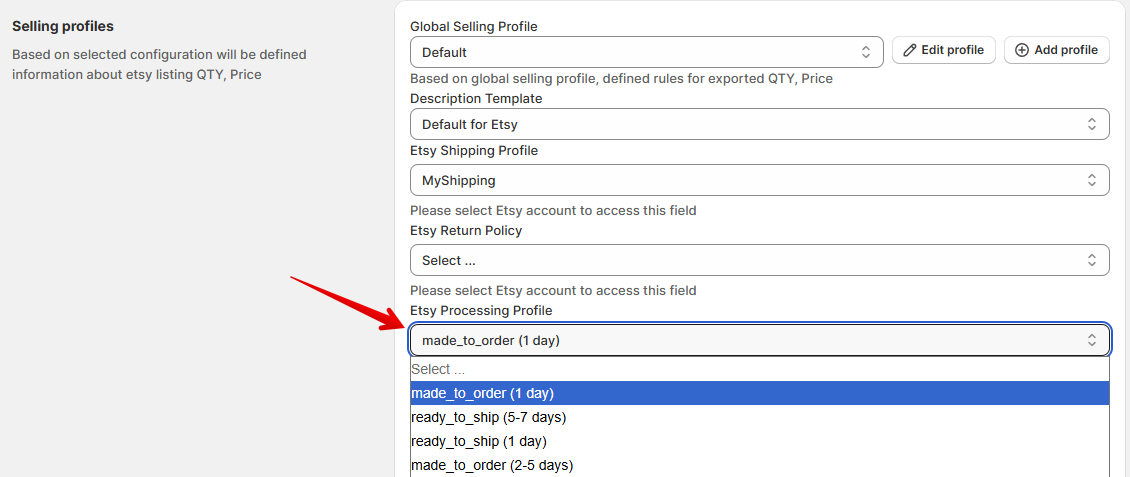
To apply the Processing Profile to the existing listings, run the Update action instead of just Update QTY & Price. The Update action does the full update of the Etsy listings. So, the Creation profile should also be added.
If you do not want to do the full update of the Etsy listings through Salestio, please assign the Processing Profile directly on Etsy. Follow these steps to assign the Processing Profile to the listings in bulk https://help.etsy.com/hc/en-us/articles/115015588087-How-to-Set-Processing-Times-Processing-Profiles-and-Ship-By-Dates?segment=selling#h_5